
Privacy Screen Filter1.9 - Google Play
You'll be able to see results in few seconds.
Publisher Description
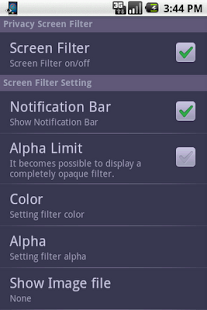
This is an application that displays the filter on the screen, and prevents the peep from surroundings.
It confirms the operation with Xperia.
Please teach the kind and the phenomenon of the smart phone used when trouble occurs. I will deal.
Notification:
In IS04, there is a problem you can't turn off the filter if the filter is turned on like initialization immediately after the installation.
So please operate alpha change before turning on the filter.
(1) The color and the transparency etc. of the filter can be freely changed.
(2) Function to always display statusbar at full-screen.
(3) It is also possible to display the image in the filter.
(4) It is also possible to turn the filter on and off from the notification bar.
(5) There is an effect of suppressing the battery consumption, too. (Galaxy etc...)
(6) It became possible to use the widget function .
The icon is switched and the display of the filter can be switched when touching.
If you use the statusbar forced display function
The clock of the statusbar can be seen soon even in the game that "Angry Birds" and "Robo Defence ", etc. inadvertently become crazy.
Moreover, please evaluate, and comment if you can like this application.
The bug report you to review field fine, but There is no attempt to go in dealing with written information such as your model. Please observe the manners of a field review.
Caution:
Please do the exclusion setting if you use task killer application program (Task Manager and Automatic Task Killer , etc.).
The Internet connection authority is used only for an advertising display.
[Tool Convenience Camera Battery GalaxyS Galaxy Tab Power consumption veilview]
About Privacy Screen Filter
The company that develops Privacy Screen Filter is Yuki Ochi. The latest version released by its developer is 1.9.
To install Privacy Screen Filter on your Android device, just click the green Continue To App button above to start the installation process. The app is listed on our website since 2014-01-04 and was downloaded 0 times. We have already checked if the download link is safe, however for your own protection we recommend that you scan the downloaded app with your antivirus. Your antivirus may detect the Privacy Screen Filter as malware as malware if the download link to com.yuki.ochi.privacyfilter is broken.
How to install Privacy Screen Filter on your Android device:
- Click on the Continue To App button on our website. This will redirect you to Google Play.
- Once the Privacy Screen Filter is shown in the Google Play listing of your Android device, you can start its download and installation. Tap on the Install button located below the search bar and to the right of the app icon.
- A pop-up window with the permissions required by Privacy Screen Filter will be shown. Click on Accept to continue the process.
- Privacy Screen Filter will be downloaded onto your device, displaying a progress. Once the download completes, the installation will start and you'll get a notification after the installation is finished.
Program Details
System requirements
Download information
Pricing
Version History
version 1.9
posted on 2014-01-04
1.9:Bug fixed.,1.8:Bug fixed.,1.7:Bug fixed.,Deletion of function completely opaqued.,1.6: Bug fix and A part of display character string was changed.,1.5: The statusbar forced display function is added.,The filter color default is changed to white.,The limitation of the filter color is released.,It advertising displays it along with the function addition.,1.4: Widget function is added.,1.3: Filter alpha limit function is added.,Bug fix.
version 1.8
posted on 2011-09-10
Several fixes and updates
Disclaimer
Official Google Play Link
We do not host Privacy Screen Filter on our servers. We did not scan it for viruses, adware, spyware or other type of malware. This app is hosted by Google and passed their terms and conditions to be listed there. We recommend caution when installing it.
The Google Play link for Privacy Screen Filter is provided to you by apps112.com without any warranties, representations or guarantees of any kind, so access it at your own risk.
If you have questions regarding this particular app contact the publisher directly. For questions about the functionalities of apps112.com contact us.
